Mood Journal KDP Interior Template: A Practical Tool for Self-Reflection Publishing
When you are preparing content for print‑on‑demand platforms like Amazon KDP, the quality of your interior layout can determine whether a buyer sees a professional product or something that feels hastily assembled. The Mood Journal KDP Interior Template is a ready‑to‑use set of files designed specifically for anyone creating mood‑tracking journals, diaries, or guided reflection notebooks. It provides a structured foundation that saves hours of formatting work while maintaining the polished look that Kindle Direct Publishing buyers expect.
What Makes the Mood Journal KDP Interior Template Worth Your Attention
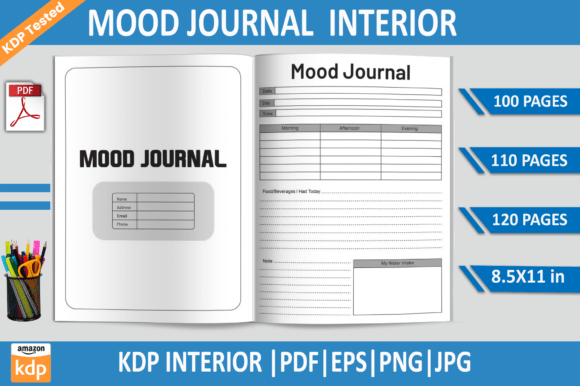
At its core, this template package is a collection of print‑ready files for a mood journal interior. It includes PDF files at three page counts—100, 110, and 120 pages—plus EPS, PNG, and JPG formats. The page size is a standard 8.5 × 11 inches, which works well for both at‑home printing and KDP’s paperback specifications. With 300 DPI resolution and a no‑bleed layout, the files are already optimized for upload to Amazon KDP without requiring additional tweaking.
What sets this offering apart from generic blank notebooks is that it has been tested on Amazon KDP for compliance. That means the margins, trim lines, and spine calculations have already passed the basic checks that can otherwise cause rejection or poor print quality. For someone who wants to publish a mood journal quickly and with confidence, this pre‑testing removes a significant layer of uncertainty.
Multiple Page Count Options
Having three PDF variants—100 pages, 110 pages, and 120 pages—gives you flexibility in pricing and perceived value. A 100‑page journal feels lightweight and approachable, suitable for a monthly or quarterly tracker. The 120‑page version offers more room for extended reflection, which can appeal to buyers looking for a longer commitment. You can test different price points or target different customer segments without redesigning the interior from scratch.
Editable and Non‑Editable Formats
The inclusion of an EPS file means you can open the layout in Adobe Illustrator and customise elements such as fonts, section headings, or decorative motifs. This is valuable if you want to add your own branding, adjust the colour scheme, or insert personal prompts. At the same time, the PNG and JPG files allow quick previewing or use in mockups. The transparent‑background PNG is especially handy if you want to create a listing image that shows the interior style without hard edges.
Standardised Dimensions and Resolution
The 8.5 × 11 inch size is a KDP favourite because it fills a standard page without requiring unusual paper stock. The 300 DPI resolution ensures that any text or simple graphics within the template will print sharply, even on low‑cost print‑on‑demand equipment. Because there is no bleed, you do not need to worry about content being trimmed off during the binding process—everything stays safely within the printable area.
Strengths That Matter in Real‑World Publishing
One of the strongest aspects of this template is its reliability. Because the files were tested on Amazon KDP, you can upload them with reasonable confidence that they will pass the platform’s automatic review. This is not trivial: many first‑time publishers waste days reformatting interiors that fail at the review stage. The testing also covers the no‑bleed specification, which is less forgiving than a bleed layout if your margins are off.
Another strength is consistency across formats. The PDF, EPS, PNG, and JPG versions all maintain the same layout proportions and spacing. If you adjust one file, you can apply the same changes to the others without guesswork. This consistency becomes important when you need to produce different product variations—for example, a paperback edition (PDF) and a digital planner version (PNG or JPG).
The CPC value of having a ready‑to‑upload interior is also worth noting. For someone who spends £200–£400 per month on Amazon ads per title, days spent formatting mean days without revenue. This template lets you move from concept to listing in a single session, assuming you already have the cover prepared.
Potential Limitations and Practical Considerations
While the template is well‑suited for a standard mood journal with daily or weekly entries, it may feel restrictive if you want a highly artistic or unconventional layout. The EPS file does give editing capability, but you will need Adobe Illustrator—or a compatible vector editor—to make those changes. If you work exclusively with free or browser‑based tools, the EPS file may not be directly usable, and you would rely on the PDF version instead.
Additionally, the lack of bleed means that decorative elements that you add later must stay well within the margin boundaries. If you later decide to add full‑page colours or background illustrations, the no‑bleed format would require you to recalculate margins or switch to a bleed version. This template is therefore best suited for content that stays clean and minimal, rather than heavily illustrated spreads.
Another point to consider is that the template includes three PDF page counts, but you cannot easily combine them into one hybrid file. If you want a 115‑page journal, you would need to manually remove or add pages using a PDF editor. For most publishers, the provided counts are sufficient to cover the popular price tiers, but it is worth noting if you target a very specific page number for perceived value.
Who Benefits Most from This Mood Journal Interior
This template is a good fit for several groups of publishers and creators.
- First‑time KDP publishers who want to test the mood journal niche without investing heavily in custom design. The pre‑tested files reduce the risk of rejection and allow a quick launch.
- Experienced publishers scaling their catalogue. If you already publish several journals and notebooks per month, having a reliable interior template that you can repurpose with different covers saves significant time.
- Freelancers and design agencies producing journals for clients. The EPS file gives you the flexibility to adapt the layout to a client’s branding, while the PDF versions serve as a delivery option.
- Educators and therapists who want to create a physical tool for mood tracking or emotional awareness. The straightforward no‑bleed layout avoids distractions and keeps the focus on the prompts or check‑in sections.
- Small business owners selling printed planners via Etsy, Shopify, or local print shops. The JPG and PNG files can be used for digital previews or low‑cost trial prints before committing to a larger run.
Real‑World Effectiveness and Long‑Term Value
From a practical standpoint, the template serves its purpose: it provides a clean, functional interior for a mood journal that meets Amazon’s printing standard. The 300 DPI resolution ensures that any text or simple line art prints crisply, and the no‑bleed layout means you are less likely to produce a batch of misprinted copies. Over time, you can build a series of journals by reusing the same interior with different cover designs—each release reinforces your brand presence in the self‑help or personal development category.
One realistic example: a publisher launches a 100‑page mood journal as a low‑cost entry product. After collecting reviews and understanding customer preferences, they release a 120‑page version with slightly different prompts and a fresh cover. Both use the same template, so the production time for the second title is essentially zero beyond creating the cover and adjusting the metadata. This kind of efficiency is where the template’s long‑term value becomes apparent.
That said, the template is not a complete solution. You will still need to create a compelling cover, write product descriptions, set pricing, and manage your KDP account. The interior alone does not guarantee sales, but it does remove a common bottleneck that slows down many aspiring publishers.
Practical Recommendations for Getting the Most Out of This Template
If you decide to use the Mood Journal KDP Interior Template, here are a few approaches that can maximise its usefulness.
- Start with the 100‑page PDF if this is your first journal. The lower page count reduces your printing cost per unit, which can be helpful when you are still testing the market response.
- Customise the EPS file to add a few unique prompts or themed weekly spreads. Small adjustments make the product feel distinct while keeping the structural layout intact.
- Use the PNG files for A+ content or behind‑the‑scenes previews on your product page. A transparent PNG showing the interior layout against a soft background can help buyers visualise the journal before purchasing.
- Bundle two or three page count variants under different ASINs to test which price point converts best. Because the interior style is identical across all three PDFs, you are comparing page count and price rather than design quality.
- Keep a backup of all file formats in a single folder labelled with the release version. If you need to re‑upload or create a derivative product months later, having the EPS and originals saves you from re‑editing.
Final Thoughts on the Mood Journal KDP Interior Template
The Mood Journal KDP Interior Template delivers what it promises: a set of print‑ready files that have been checked against Amazon’s technical requirements. It offers practical flexibility through multiple page counts and editable vector files, and it eliminates one of the most frustrating parts of self‑publishing—the formatting and testing phase. For publishers who want to move quickly in the mood journal niche without sacrificing print quality, this interior provides a solid foundation. While it may require an editor like Illustrator for deeper customisation, the included PDF, PNG, and JPG formats cover the majority of publishing needs right out of the box. If your goal is to launch a clean, professional mood journal with minimal friction, this template is a reliable option worth considering.