Cute Food Coloring Pages: Why Most Downloads Fall Short and How to Get It Right
Coloring pages featuring adorable food characters—think smiling strawberries, cheerful cupcakes, and winking tacos—have become a staple for parents, educators, and creators. These pages are more than just a quiet activity; they spark creativity, improve fine motor skills, and provide a screen-free break for young learners. But if you’ve ever downloaded a set of cute food coloring pages only to end up frustrated with blurry prints, awkward sizing, or a file that just won’t work with your printer or publishing platform, you’re not alone. Many well-intentioned downloads miss critical details that turn a promising resource into a headache.
Whether you’re a teacher building a classroom activity binder, a parent looking for afternoon fun, or an entrepreneur creating a high-content book for Amazon KDP, understanding what makes a coloring page truly usable can save you time, money, and disappointment. Let’s walk through the most common mistakes people make when choosing and using cute food coloring pages—and how to avoid them.
Mistake #1: Ignoring the Print Specifications
You’ve found a set of cute food coloring pages that look perfect on screen. The lines are crisp, the designs are charming, and the file downloads instantly. But when you hit print, the image comes out too small, too large, or cuts off at the edges. This is almost always a result of ignoring the print specifications before downloading.
Many free or cheap coloring pages aren’t created with standard print sizes in mind. They might be intended for screen use only, or the designer simply didn’t set up the canvas correctly. The specification you see—like 8.5″ x 11″ Inch—isn’t just a number. It’s the foundation for a hassle-free print experience. A page that isn’t sized correctly will either need manual resizing (which often distorts the design) or will waste paper because margins don’t match.
What to check: Before you download or purchase any set of cute food coloring pages, confirm the file dimensions. The best resources clearly state the size, often in inches or millimeters. For most home printers and standard KDP interiors, 8.5″ x 11″ (US Letter) is the safe choice. And make sure the file specifies whether there is bleed or no bleed—more on that in a moment.
Mistake #2: Overlooking Bleed Settings
Bleed is one of those printing terms that seems technical but is actually very simple. When a design has “bleed,” it means the artwork extends beyond the trim edge of the page so that when the page is cut, there’s no white border left. For a coloring page that you’re handing to a child, a white border is usually fine—in fact, it’s often preferred. But if you’re publishing a coloring book through KDP or another print-on-demand service, bleed matters a lot.
The specification Bleed: No Bleed tells you that the design is intended to sit inside the page with margins, not run to the edge. This is perfectly appropriate for coloring pages because children need a clear boundary to stay inside, and most printed books are trimmed with a small margin anyway. However, if you were to take a “no bleed” file and try to use it for a full-bleed book, you’d get white strips along the edges after trimming.
The practical advice: Know your end goal. If you’re printing at home or in a classroom, no bleed is ideal—no worry about cutting off parts of the cute cupcake’s frosting. If you’re publishing, check the platform’s requirements. But for most coloring page uses, no bleed is perfectly fine and even preferable.
Mistake #3: Assuming All PDFs Are Print-Ready
A PDF file extension doesn’t guarantee that the file is optimized for printing. Some PDFs are created for digital viewing and have low resolution or embedded fonts that cause issues. When you’re working with cute food coloring pages, you want a PDF that is Print Ready.
What does print ready mean in practical terms? It means the file has been flattened (so layers don’t shift), includes all fonts (or converted to outlines), and has a resolution of at least 300 DPI. Low-resolution pages look fine on a tablet but come out pixelated and disappointing on paper. Young children won’t care about pixelation, but if you’re selling a product or building a professional resource, it matters.
How to avoid this mistake: Look for descriptions that specifically say “Print Ready PDF” or “300 DPI.” If possible, check the file properties after downloading. In Adobe Acrobat or Preview, you can view the image resolution. If the file is only 72 DPI, it’s not suitable for crisp printing. The specification you see—Print Ready PDF File—is a green flag, but always test with one page before printing a batch.
Mistake #4: Not Testing the Layout on Young Learners
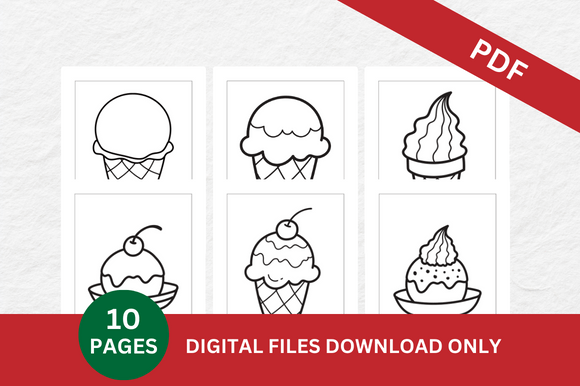
A coloring page can look fantastic to an adult but be frustrating for a child. Common issues include overly intricate lines, too many small details, or designs that don’t leave enough white space for coloring within the lines. Cute food coloring pages are especially tricky because the food shapes (like ice cream cones, donuts, or broccoli) can have lots of small parts.
What looks charming at full size might become overwhelming when a preschooler tries to color a strawberry with dozens of tiny seeds. The best designs balance cuteness with usability: thick, clear outlines, moderate complexity, and areas that are large enough for a chunky crayon.
Better approach: If you’re downloading for a young child, preview the complexity. Look for lines that are at least a few millimeters thick. Avoid designs with many tiny circles or tight spaces. For older children or adults, more detail is fine. Know your audience before you commit to a set of pages.
Mistake #5: Forgetting to Check the Number of Pages
This sounds obvious, but many buyers and downloaders overlook the page count until they’ve already printed half the set. The specification Pages: 10 Arts is clear—you’re getting ten unique designs. But sometimes the files you find online are advertised as “20 coloring pages” when in reality half are duplicates, or the file includes cover pages that aren’t for coloring.
Why it matters: If you’re putting together a book or a lesson plan, knowing exactly how many usable pages you have is critical. A 10-page set might be perfect for a small activity booklet, but if you need more variety, you’ll want to source additional pages. Avoid the disappointment of expecting quantity and getting fewer distinct images.
What to do: Always look at the preview or sample pages to see each design. Count them yourself. Check if there are any repeated images with different backgrounds. Reliable sellers will clearly state the page count, like “10 Arts” or “10 unique designs.”
Mistake #6: Overlooking Licensing for Commercial Use
If you’re downloading cute food coloring pages to use in a classroom, for personal enjoyment, or as a freebie, licensing is usually straightforward. But if you plan to sell the coloring pages—either as a standalone product, inside a book on KDP, or as part of a paid subscription—you need to understand the terms.
Many free resources are for personal use only. Using them commercially without permission can get you into legal trouble, and platforms like Amazon require you to have the rights to the content you publish. The specification you see doesn’t mention licensing, but any responsible seller will include a usage license in the product description.
How to handle this: Before you download, look for a clear statement: “Personal use only” or “Commercial use allowed.” If it’s not stated, assume it’s personal use. For KDP projects, you need either an unrestricted commercial license or the pages must be your own original work. Some designers offer extended licenses for a small additional fee. Don’t skip this step—it can cost you your account.
Mistake #7: Skipping the Print Test
Even when everything looks right on paper (or screen), the final printed page can surprise you. Colors may render differently, lines may appear thinner than expected, or the page may not align with your preferred paper size. A single test print takes two minutes and can save you from wasting a whole pack of paper.
Practical advice: Print one page of the cute food coloring pages as soon as you download them. Check the margins—do they match the edges? Is the image centered? Is the line quality good? If you’re using the file for KDP, upload a test to the platform’s previewer to see how it will look in the final book. The specification Dimensions 8.5″ x 11″ Inch should match your actual paper. If you have an odd paper size, adjust your printer settings accordingly, but be aware that scaling can distort the design.
What to Look for in High-Quality Cute Food Coloring Pages
Now that you know what to avoid, here’s a quick checklist for choosing the right set for your needs:
- Clear dimensions – preferably 8.5″ x 11″ for standard use.
- No bleed – perfectly fine for most coloring page applications.
- Print-ready PDF – 300 DPI, flattened, with embedded fonts.
- Consistent page count – know exactly how many designs you’re getting (e.g., 10 arts).
- Appropriate complexity – match the detail level to the age of the intended user.
- Licensing clarity – know if you can use it commercially.
- Tested before use – always print one page first.
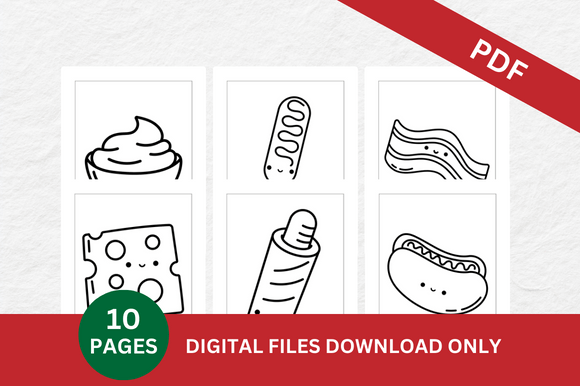
When a set meets these criteria, you can confidently download and use it without second-guessing. The specification listed—Dimensions 8.5″ x 11″ Inch, Pages 10 Arts, Bleed No Bleed, Print Ready PDF File—is exactly the kind of clarity you want. It tells you the file is formatted for common printers, gives you a precise number of unique images, indicates that margins are intact, and confirms the PDF is optimized for printing.
Making the Most of Your Coloring Pages
Once you have a reliable set of cute food coloring pages, the possibilities are wide open. Use them for quiet time activities, classroom centers, birthday party favors, or as content for a self-published book. The key to success is starting with a file that won’t fight you at the print stage. Every minute you spend troubleshooting a poorly made PDF is time you could spend coloring, teaching, or growing your business.
Remember that the cutest designs in the world lose their appeal if they’re impossible to print, too fiddly for small hands, or legally risky to sell. By paying attention to the specifications and testing before you commit, you ensure that the only surprise is how much fun your young learner has coloring that smiling piece of pizza.
Whether you’re just starting out or you’ve been creating coloring resources for years, these practical checks will keep your projects running smoothly. Download wisely, print confidently, and let the creativity flow.